![logo.png]](https://kb.coraltreetech.com/hs-fs/hubfs/CoralTree/logos/logo.png?height=23&name=logo.png)

This article is intended users under the Basil Advanced plan. Basil Simple users can refer to this article.
Multi-Entity Clients must first be enabled for the Account Owner by Basil Support. Please contact us to get access to this Client Type.
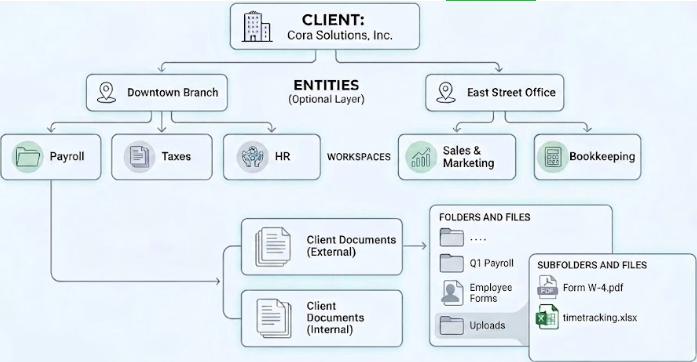
Entities are an organizational layer designed to be used for complex organizations or business partnerships that contain multiple businesses. By setting up a Multi-Entity Client, you can group several businesses under a single Client profile while maintaining a distinct Workspace structure for each, allowing you to organize by department or service within each specific business Entity.
As a reminder, Primary and Client Users only have access to one Client in your Basil account. Multi-Entity Clients also allows you to invite multiple business owners to access the file portal while keeping each Entity separated via a dropdown menu. You can also allow access to the business’ employees to one or more Workspaces inside Entities under the same Client.
User Types:
- Primary User - Up to one Primary User has access to all Entities and Workspaces for the Client.
- Client Admins - Any number of Client Admins have access all Entities and Workspaces (by default Permissions).
- Client Users - Any number of Client Users have access one or multiple Workspaces (by default Permissions).
TIP: If you use Basil Drive, be sure to toggle on the 'Enable Path Length Validation' setting to avoid errors related to longer folder paths.
The following graphics shows the relationship between Clients, Entities, Workspaces, and their folders: