![logo.png]](https://kb.coraltreetech.com/hs-fs/hubfs/CoralTree/logos/logo.png?height=23&name=logo.png)
Although rare, you may experience errors as you navigate through the Qbox Web Dashboard (https://qboxplus.coraltreetech.com/). You can reference this article to see explanations or suggestions to some of those errors.
CAPTCHA Error Upon Login
Problem: At the Qbox web login screen, the user gets the below error after putting in their email address.
“The data you entered for the CAPTCHA wasn't correct or CAPTCHA is required. Please try again.”
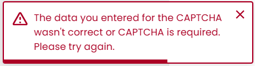
We suspect this is an issue caused by the CAPTCHA 3rd party system that CoralTree does not have direct control over. It seems to affect all other devices associated with the network your computer is connected to.
Workaround 1: If you are trying to log into the Web Dashboard in order to install Qbox Client, you can use the relevant installation link instead:
- Click here if you use Qbox in Single-User (SU) mode (most common)
- Click here if you use Qbox in Multi-User (MU) mode
After installing and logging into Qbox Client/Explorer, if it shows a message saying you have not set up any folders yet, and if you were invited to join someone else’s Qbox folder, please ask that person to uninvite and reinvite you to the folder.
Workaround 2: You can typically wait overnight and try again, as it seems that the issue gets resolved automatically a day later.
Workaround 3: You can try the following:
- Disconnect your phone or mobile device from any Wi-Fi network temporarily
- On your phone or mobile device, in a web browser, go to qboxplus.com
- Attempt to log in with your credentials
- If you do not get the CAPTCHA error again, you can proceed to temporarily use the web dashboard to do the function you were initially trying to do
- You may need to enable desktop mode on your mobile browser (Chrome) to be able to see the interface more clearly
If these workarounds do not work, please reach out to Qbox Support for further assistance.