![logo.png]](https://kb.coraltreetech.com/hs-fs/hubfs/CoralTree/logos/logo.png?height=23&name=logo.png)

If you want to remove a Client from your Client list in the People tab but don't want to delete their files yet, you can do so by deactivating them. To do this, click the three dots to the right of the Client you want to deactivate, then click 'Deactivate Client'.
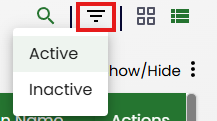
To view your deactivated Clients, in the People tab, click the filter icon (three horizontal lines) on the top-right and toggle to 'Inactive'. From there, you can click the three dots to the right of one of the Clients to reactivate or delete them.